19 November 2026 · For production schedulers
What-If at the Speed of a Sentence
A schedule is never finished. Material arrives late, a rush job lands, someone is out. The hard part is not deciding what to do. It is the time it takes to move twenty tasks and check the damage. With Claude or ChatGPT connected to Standard Time®, you can ask for the change in a sentence, read the preview, and approve it. The Gantt chart stays your judge.
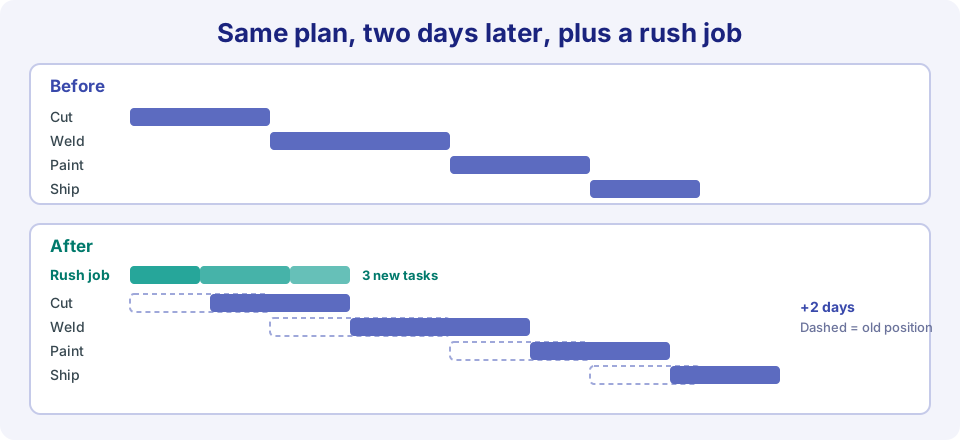
One request: slide the job two days and make room for a rush job. (Illustration.)
Four Situations, Four Sentences
Each example shows what you ask, what the preview lists, and what to check afterward. Names and numbers are made up; use your own jobs.
A job slips
The situation
Material for Housing Cast arrives two days late.
You ask
“Move all open Housing Cast tasks back two days.”
The preview shows
Each affected task with its old and new dates. Nothing is saved yet.
People are over-booked
The situation
Next week looks heavy for one welder and light for another.
You ask
First: “Who has the most assigned hours next week?” Then: “Reassign Welder 2's open tasks this week to Welder 3.”
The preview shows
The tasks that would change hands, listed by task. Planned hours stay as they are.
A rush job lands
The situation
A customer needs a small run, and it has to start now.
You ask
“Create a job called Rush Bracket with tasks Cut, Weld, and Inspect, in that order, and make each one a predecessor of the next.”
The preview shows
The new project and its three tasks, with their links. Adding tasks needs the right to create project tasks, and a new project needs an administrator.
An estimate changes
The situation
Paint is taking longer than planned on every job.
You ask
“Raise the planned hours on all open Paint tasks by 20 percent.”
The preview shows
Each task with its old and new planned hours. Read the new numbers, because arithmetic is the one place to double check.
Big Schedules Are Built in Rounds
The assistant works on one proposal at a time. A preview lists up to 25 rows, and one proposal can create up to 25 new tasks. A bigger plan is simply several rounds: apply the first, then attach the next tasks to the project it created.
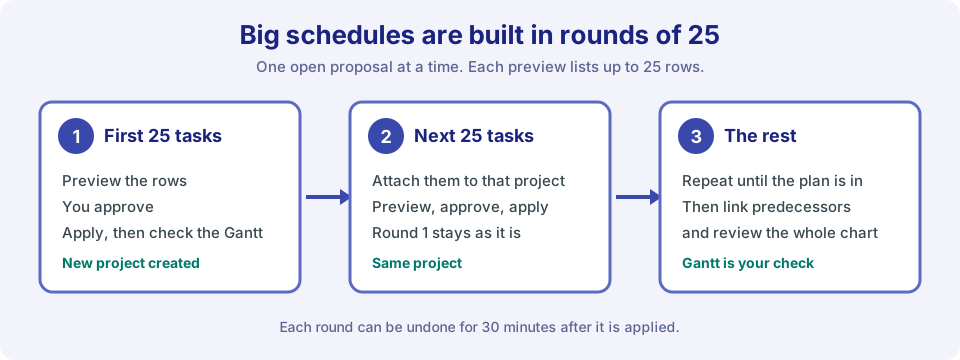
Round by round, with undo available for 30 minutes after each apply.
Your Gantt Is Still the Check
- Judge the plan on the chart. The assistant is for asking and for bulk edits. The Gantt chart is where you decide whether the result works.
- A project that does not change. A project whose AI-updates setting is off is skipped. If a project was left out of a preview, check that setting.
- What it can edit. Percent complete, dates, planned hours, billable flag, category, subproject, assignment, predecessors and successors, description, and task order, plus new tasks and projects. It never touches time logs, expenses, or invoices.
- Undo. A change can be undone for 30 minutes after it is applied.
Built-In AI Chat or Claude and ChatGPT?
Use both for what each does best. The built-in AI Chat can build a schedule from a plain-language description and level resources inside Standard Time®. Claude and ChatGPT shine at answering questions about your live data and editing tasks by request. AI for Manufacturing compares all three side by side.
Try It on a Spare Project
- Ask an administrator to connect Claude or ChatGPT.
- Create a throwaway project and ask for a change like the examples above.
- Preview, apply, and undo it. The Claude and ChatGPT smoke tests walk through exactly that.
Good to know: cloud accounts only. Claude is made by Anthropic and ChatGPT by OpenAI; neither is affiliated with Standard Time®.