AI for Manufacturing

Ask your shop-floor data a question the way you would ask a coworker. Standard Time® gives you three ways to use AI with your own projects, tasks, and hours: the assistant built into the product, or the Claude or ChatGPT account your team already uses. In every case, a change is previewed and needs your approval before it is saved.

Choose Your Way In

All three work with your live Standard Time® data. Pick the one that fits how your team already works.

Built-In AI Chat

Describe a project in plain language and let AI build the schedule, analyze progress, reschedule tasks, or level resources, right inside Standard Time®. Nothing is saved until you approve a confirmation prompt.

AI Chat Guide AI Providers

Claude Chat

Connect Claude and ask about your jobs, tasks, and hours in plain English. It signs in as you, sees only what you may see, and previews every task change for your approval, with undo for 30 minutes.

Setup Guide Smoke Test

ChatGPT

Connect ChatGPT the same way, with the same rights, previews, and undo. Keep the assistant your team already uses, and let it answer from your own data.

Setup Guide Smoke Test
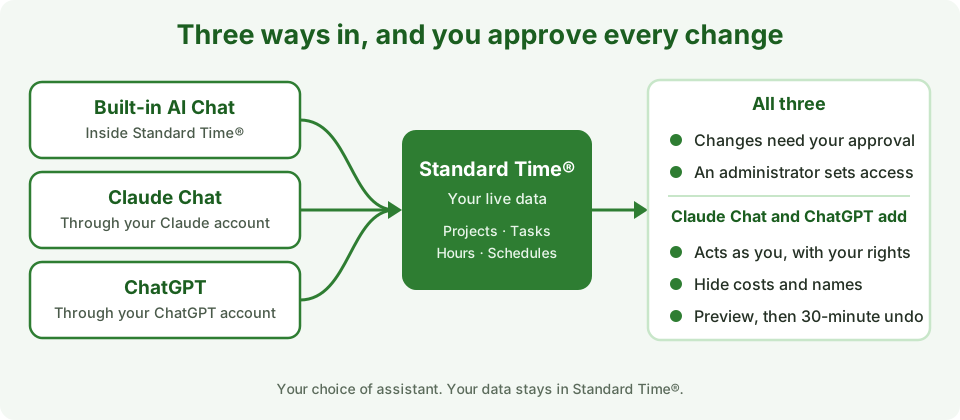
Three paths, the built-in AI Chat, Claude Chat, and ChatGPT, lead to live Standard Time data, with approval required for every change

Three ways in. Your data stays in Standard Time®.

What AI Can Do for Your Shop

Answer Questions From Live Data

“Which jobs are behind this week?” “How many hours did we log on job 10200?” You get an answer from your current records, without building a report.

Make Quick Schedule Updates

Move dates, adjust planned hours, reassign tasks, record progress, or add tasks by asking. You see a preview first, and nothing changes until you approve it.

Build and Analyze Schedules

With the built-in AI Chat, describe a project and get a structured schedule with tasks, durations, and dependencies, or ask it to analyze progress and level resources.

Level Resources and Reschedule

With the built-in AI Chat, ask it to resolve resource conflicts and reschedule tasks when priorities shift, so over-booked people and idle gaps are spotted and fixed faster.

Create and Copy Tasks and Projects

With Claude Chat or ChatGPT, ask for new tasks on a job, or for a copy of an existing project as a starting point. Each request can create up to 25 tasks, and a new project needs an administrator.

Stay in Control

Claude Chat and ChatGPT act as you, with your rights. You can hide cost fields and user names, make a connection read-only, and disconnect any time.
Which One Fits Your Team?

If your team is already comfortable in Claude or ChatGPT, connecting it is usually the quickest route. If you want everything inside Standard Time®, use the built-in AI Chat.

Built-in AI ChatClaude ChatChatGPT
Where you use itThe AI Chat panel in Standard Time®Your Claude chatsYour ChatGPT chats
Whose account it usesThe AI provider and key your administrator assignsYour own Claude accountYour own ChatGPT account
Who sets it upAn administrator adds the provider and modelAn administrator approves the sign-inAn administrator approves the sign-in
Before a change is savedA confirmation promptPreview, your approval, then undo for 30 minutesPreview, your approval, then undo for 30 minutes
What it can changeProjects and tasks, with your confirmationProject tasks only. Never time logs, expenses, invoices, or deletes.Project tasks only. Never time logs, expenses, invoices, or deletes.
Plans and availabilityDepends on the provider you chooseSet by Anthropic. Check their current plan details.Set by OpenAI. Check their Help Center.

Claude Chat and ChatGPT use the Standard Time® MCP Server, available for cloud accounts. What is an MCP Server?

Get Started

  1. Pick a path. Use the table above, or read the guide for the one you like.
  2. Connect it. An administrator adds an AI provider for the built-in AI Chat, or connects Claude or ChatGPT in Tools, Integration, MCP Server.
  3. Ask a first question. Start with something you can check on your own grids.
  4. Run a smoke test. The Claude and ChatGPT smoke tests take about 10 minutes and end with a throwaway project you preview, apply, and undo.

Put AI to Work on Your Shop Floor

Start a free 30-day trial and ask your own projects, tasks, and hours a question.

View Pricing Contact Us