The 11 Entity Sets
The Standard Time® OData feed exposes 11 entity sets over a single HTTPS endpoint. Each maps to one table you can pull into Power BI, Excel, or any OData-compatible tool. The base URL pattern is:
https://stcloud67.com/odata/{EntitySet}?cid={YourCID}
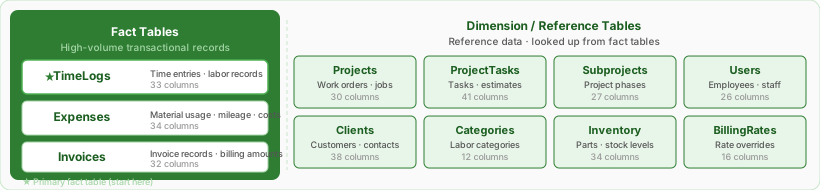
| Entity Set | Entity Type | Primary Key | What It Contains |
|---|---|---|---|
TimeLogs | TimeLog | TimeLogID | Every time entry — who worked, on which project and task, start/end, duration, billable flag, computed cost |
Projects | Project | ProjectID | Work orders and jobs — status, dates, billing type, quoted cost, folder, assembly line |
ProjectTasks | ProjectTask | TaskID | Task rows under each project — estimated vs. actual hours, cost estimates, percent complete, due dates |
Subprojects | Subproject | SubsystemID | Project phases and nested sub-assemblies (the "subsystem" level between projects and tasks) |
Users | User | UserID | Employee roster — name, email, workgroup, role, billing rates, hire date |
Clients | Client | ClientID | Customer records — contacts, addresses, tax rate, payment terms |
Expenses | Expense | ExpenseID | Material usage, out-of-pocket costs, and mileage; created automatically by inventory barcode scans |
Inventory | InventoryItem | InventoryID | Parts catalog — name, SKU, qty in stock, unit cost, reorder thresholds, vendor |
Categories | Category | CategoryID | Labor and expense categories (e.g., Machining, Assembly) with optional per-category billing rates |
Invoices | Invoice | InvoiceID | Invoice records — subtotal, tax, amount paid, balance due, paid-in-full flag |
BillingRates | BillingRate | BillingRateID | Per-user, per-project, or per-category rate overrides with effective date ranges |
ProjectName, UserName) so a basic query returns readable labels without requiring a join. The FK columns (e.g., ProjectID, UserID) are also included for building relationships in BI tools. For simple ad-hoc queries, the denormalized fields are sufficient. For dashboards with slicers and cross-filtering, define proper FK relationships.
Column Schema by Entity
TimeLogs33 columns · primary fact table
One row per time entry. Join to all six dimension tables on the FK columns below. TimeLogDurationHours is the key measure field for most labor dashboards.
| Column | Type | Description |
|---|---|---|
TimeLogID PK | String | Primary key — unique identifier for this time entry |
Date | Date | Date of the time entry (no time component); use for date-range filters and grouping by day/week/month |
StartTime | DateTimeOffset | Timestamp when the timer started; includes UTC offset |
EndTime | DateTimeOffset | Timestamp when the timer stopped; null if the timer is still running |
TimeLogDurationHours | Decimal(18,4) | Duration in hours (e.g., 1.5000 = 90 minutes). Primary measure for labor dashboards. |
Billable | Boolean | Whether this time entry is billable to the client |
Billed | Boolean | Whether this entry has been included on an invoice |
Approved | Boolean | Whether this time entry has been approved by a manager |
TimeLogCostClient | Decimal(18,4) | Computed client-billable cost: hours × client rate |
TimeLogCostSalary | Decimal(18,4) | Computed internal labor cost: hours × salary/payroll rate |
TimeLogClientRate | Decimal(18,4) | Client billing rate applied to this entry ($/hr) |
TimeLogSalaryRate | Decimal(18,4) | Salary/payroll rate applied to this entry ($/hr) |
TimeLogQty | Decimal(18,4) | Units produced (if tracking production quantity alongside time) |
Notes | String | Free-form text notes attached to this time entry |
Location | String | Location tag (e.g., work cell, site, or machine) |
Created | DateTimeOffset | Record creation timestamp; use as the filter column for incremental data loads |
Modified | DateTimeOffset | Last-modified timestamp |
UserID FK | String | FK → Users.UserID |
ProjectID FK | String | FK → Projects.ProjectID |
ClientID FK | String | FK → Clients.ClientID |
ProjectTaskID FK | String | FK → ProjectTasks.TaskID (note: column names differ) |
CategoryID FK | String | FK → Categories.CategoryID |
SubsystemID FK | String | FK → Subprojects.SubsystemID |
UserName DN | String | Employee username — denormalized from Users |
TimeLogUserFullName DN | String | Employee full name — denormalized from Users |
ProjectName DN | String | Project/work order name — denormalized from Projects |
ClientName DN | String | Customer name — denormalized from Clients |
TaskName DN | String | Task name — denormalized from ProjectTasks |
SubsystemName DN | String | Subproject name — denormalized from Subprojects |
CategoryName DN | String | Category name — denormalized from Categories |
UserText1 | String | Custom text field 1 (user-configurable label and data) |
UserText2 | String | Custom text field 2 |
UserText3 | String | Custom text field 3 |
Projects31 columns
Work orders and jobs. Carries both a ClientID FK (for direct joins to Clients) and a denormalized ClientName text field.
| Column | Type | Description |
|---|---|---|
ProjectID PK | String | Primary key |
ProjectName | String | Work order or job name |
Description | String | Free-form description |
Status | String | Project status (e.g., Open, In Progress, Closed) |
Priority | String | Priority level |
Active | Boolean | Whether this project is active and visible on the shop floor |
ProjectProjectCode | String | User-assigned project code or job number |
BillingType | String | Billing method (Fixed, Hourly, etc.) |
ProjectClientRate | Decimal(18,4) | Default client billing rate for this project ($/hr) |
ProjectSalaryRate | Decimal(18,4) | Default internal labor cost rate for this project ($/hr) |
ProjectQty | Decimal(18,4) | Estimated quantity to produce |
ProjectQtyBuilt | Decimal(18,4) | Actual quantity produced to date |
StartDate | Date | Planned start date |
FinishDate | Date | Planned finish date |
ProjectLaunchDate | Date | Launch or ship date |
DeliveryDate | Date | Customer delivery date |
ProjectQuotedDuration | Int32 | Quoted duration in seconds |
ProjectQuotedCost | Decimal(18,4) | Quoted cost to the customer |
PO | String | Purchase order reference number (text field — not a full PO system) |
ProjectFolder | String | Folder name used to group projects (filterable in grids) |
ClientID FK | String | FK → Clients.ClientID |
ClientName DN | String | Customer name — denormalized from Clients |
ProjectProjectTypeName DN | String | Project type label |
ManagerUserName DN | String | Manager username — denormalized from Users |
ManagerFullName DN | String | Manager full name — denormalized from Users |
ProjectAssemblyLineName DN | String | Assembly line name assigned to this project |
Created | DateTimeOffset | Record creation timestamp; use for incremental loads |
Modified | DateTimeOffset | Last-modified timestamp |
UserText1 | String | Custom text field 1 |
UserText2 | String | Custom text field 2 |
UserText3 | String | Custom text field 3 |
ProjectTasks41 columns
Task rows under each project. Contains the richest cost and scheduling data: estimated vs. actual vs. remaining hours, budget vs. actuals, percent complete, and due dates. Join to Projects on ProjectID; join to TimeLogs on TaskID ↔ ProjectTaskID.
| Column | Type | Description |
|---|---|---|
TaskID PK | String | Primary key — referenced as ProjectTaskID in TimeLogs |
TaskName | String | Task name |
Description | String | Task description |
Status | String | Task status |
Priority | String | Priority level |
PercentComplete | Int32 | Completion percentage (0–100) |
Completed | Boolean | True when the task is marked complete |
Billable | Boolean | Whether time logged to this task is billable by default |
StartDate | Date | Planned start date (used in Gantt scheduling) |
FinishDate | Date | Planned finish date |
TaskDueDate | Date | Customer-facing due date for this task |
CompletedDate | Date | Date the task was marked complete |
TaskDurationHours | Decimal(18,4) | Estimated duration in hours (the planned budget) |
ActualHours | Decimal(18,4) | Total hours logged against this task to date |
RemainingHours | Decimal(18,4) | Remaining estimated hours (estimate-to-complete) |
TaskCostClient | Decimal(18,4) | Estimated client cost: estimated hours × client rate |
TaskCostSalary | Decimal(18,4) | Estimated internal cost: estimated hours × salary rate |
TaskCostClientActual | Decimal(18,4) | Actual client cost from time logs logged to this task |
TaskCostClientRemain | Decimal(18,4) | Remaining client cost: remaining hours × client rate |
TaskCostSalaryActual | Decimal(18,4) | Actual internal cost from time logs logged to this task |
TaskCostSalaryRemain | Decimal(18,4) | Remaining internal cost: remaining hours × salary rate |
TaskClientRate | Decimal(18,4) | Per-task client billing rate override ($/hr) |
TaskSalaryRate | Decimal(18,4) | Per-task salary rate override ($/hr) |
TaskQuotedCost | Decimal(18,4) | Quoted cost for this task |
TaskQty | Decimal(18,4) | Estimated quantity to produce |
TaskQtyBuilt | Decimal(18,4) | Actual quantity produced |
ProjectID FK | String | FK → Projects.ProjectID |
ClientID FK | String | FK → Clients.ClientID |
SubsystemID FK | String | FK → Subprojects.SubsystemID |
CategoryID FK | String | FK → Categories.CategoryID |
ProjectName DN | String | Project name — denormalized from Projects |
ClientName DN | String | Customer name — denormalized from Clients |
SubsystemName DN | String | Subproject name — denormalized from Subprojects |
CategoryName DN | String | Category name — denormalized from Categories |
TaskProjectTypeName DN | String | Project type label |
TaskAssemblyLineName DN | String | Assembly line name |
Created | DateTimeOffset | Record creation timestamp |
Modified | DateTimeOffset | Last-modified timestamp |
UserText1 | String | Custom text field 1 |
UserText2 | String | Custom text field 2 |
UserText3 | String | Custom text field 3 |
Subprojects27 columns
Project phases and nested sub-assemblies. Sit between a Project and its Tasks in the hierarchy. TimeLogs and ProjectTasks both carry a SubsystemID FK that links here.
| Column | Type | Description |
|---|---|---|
SubsystemID PK | String | Primary key — referenced as SubsystemID in TimeLogs and ProjectTasks |
Name | String | Subproject or phase name |
ExtendedName | String | Full hierarchical name including parent path |
Description | String | Description |
Status | String | Status |
Priority | String | Priority |
Active | Boolean | Whether this subproject is active |
Level | Int32 | Nesting depth in the project hierarchy |
Order | Int32 | Display order among siblings |
SubprojectProjectCode | String | User-assigned code for this subproject |
StartDate | Date | Planned start date |
FinishDate | Date | Planned finish date |
SubprojectLaunchDate | Date | Launch date for this phase |
SubprojectQuotedDuration | Int32 | Quoted duration in seconds |
SubprojectQuotedCost | Decimal(18,4) | Quoted cost for this subproject |
SubprojectClientRate | Decimal(18,4) | Client billing rate override for this subproject |
SubprojectSalaryRate | Decimal(18,4) | Internal cost rate override |
SubprojectQty | Decimal(18,4) | Estimated quantity |
SubprojectQtyBuilt | Decimal(18,4) | Actual quantity built |
ProjectID FK | String | FK → Projects.ProjectID |
ParentID FK | String | FK → Subprojects.SubsystemID — self-referential parent for multi-level nesting |
ProjectName DN | String | Project name — denormalized from Projects |
Created | DateTimeOffset | Record creation timestamp |
Modified | DateTimeOffset | Last-modified timestamp |
UserText1 | String | Custom text field 1 |
UserText2 | String | Custom text field 2 |
UserText3 | String | Custom text field 3 |
Users26 columns
Employee roster. TimeLogs, Expenses, and BillingRates all carry UserID as a FK. Use FullName or UserName in report visuals; use UserID to define the relationship.
| Column | Type | Description |
|---|---|---|
UserID PK | String | Primary key |
UserName | String | Login username (used in barcode scanning) |
FullName | String | Display name (First Last) |
Email | String | Email address |
Active | Boolean | Whether this user is active |
Admin | Boolean | Whether this user has administrator rights |
Contractor | Boolean | Whether classified as a contractor (vs. employee) |
Exempt | Boolean | Whether the user is exempt (FLSA/overtime classification) |
Workgroup | String | Workgroup or department tree path the user belongs to |
Department | String | Department label |
EmployeeNum | String | Employee number or HR identifier |
ResourceType | String | Resource type classification (e.g., Labor, Equipment) |
HireDate | Date | Hire date |
UserClientRate | Decimal(18,4) | Default client billing rate for this employee ($/hr) |
UserSalaryRate | Decimal(18,4) | Default internal salary/payroll rate ($/hr) |
UserMileageRate | Decimal(18,4) | Reimbursement rate per mile for this employee |
Skills | String | Free-text skills description |
UserRole | String | Role code assigned to this user |
UserRoleName DN | String | Role name — denormalized from the Roles table |
ManagerID FK | String | FK → Users.UserID — self-referential manager reference |
ParentName DN | String | Manager or parent workgroup name — denormalized |
Created | DateTimeOffset | Record creation timestamp |
Modified | DateTimeOffset | Last-modified timestamp |
UserText1 | String | Custom text field 1 |
UserText2 | String | Custom text field 2 |
UserText3 | String | Custom text field 3 |
Clients38 columns
Customer records. TimeLogs, Projects, ProjectTasks, and Expenses all carry ClientID. The most column-rich entity because it stores two full contact/address blocks.
| Column | Type | Description |
|---|---|---|
ClientID PK | String | Primary key |
CompanyName | String | Customer company name |
Description | String | Description or notes about this client |
Status | String | Client status |
Priority | String | Priority level |
Active | Boolean | Whether this client is active |
ThisCompany | Boolean | True when this record represents your own company (used to mark internal jobs) |
ClientTerms | String | Payment terms (e.g., Net 30) |
Web | String | Website URL |
ClientInvoiceNote | String | Default note printed on invoices for this client |
ClientTaxRate | Decimal(18,4) | Sales tax rate applied to this client's invoices |
TaxID | String | Tax ID / EIN |
CurrencyID | String | Currency identifier for multi-currency billing |
ClientFolder | String | Folder for grouping clients |
MainContact | String | Primary contact name |
MainContactPhone | String | Primary contact phone |
MainContactMobile | String | Primary contact mobile |
MainContactFax | String | Primary contact fax |
MainContactEmail | String | Primary contact email |
MainAddress1 | String | Main address line 1 |
MainAddress2 | String | Main address line 2 |
MainCity | String | Main city |
MainState | String | Main state/province |
MainZip | String | Main postal code |
MainCountry | String | Main country |
BillingContact | String | Billing contact name |
BillingContactPhone | String | Billing contact phone |
BillingContactMobile | String | Billing contact mobile |
BillingContactFax | String | Billing contact fax |
BillingContactEmail | String | Billing contact email |
BillingAddress1 | String | Billing address line 1 |
BillingAddress2 | String | Billing address line 2 |
BillingCity | String | Billing city |
BillingState | String | Billing state/province |
BillingZip | String | Billing postal code |
BillingCountry | String | Billing country |
Created | DateTimeOffset | Record creation timestamp |
Modified | DateTimeOffset | Last-modified timestamp |
Expenses40 columns
Material usage, out-of-pocket costs, and mileage records. Expense rows are created automatically when inventory barcodes are scanned on the shop floor. Combine with TimeLogs for full job cost (labor + materials). Use ExpenseAmount as the measure.
| Column | Type | Description |
|---|---|---|
ExpenseID PK | String | Primary key |
ExpenseDate | Date | Date of the expense |
ExpenseAmount | Decimal(18,4) | Total expense amount (primary measure for material cost dashboards) |
Price | Decimal(18,4) | Unit price |
ExpenseQty | Decimal(18,4) | Quantity (units consumed in this expense record) |
Tax | Decimal(18,4) | Tax amount on this expense |
ExpenseMileageRate | Decimal(18,4) | Per-mile reimbursement rate (for mileage expense rows) |
Distance | Decimal(18,4) | Distance traveled (for mileage rows) |
OdometerBegin | Decimal(18,4) | Odometer reading at trip start |
OdometerEnd | Decimal(18,4) | Odometer reading at trip end |
Billable | Boolean | Whether this expense is billable to the client |
Billed | Boolean | Whether this expense has been invoiced |
Reimbursable | Boolean | Whether this expense is reimbursable to the employee |
Reimbursed | Boolean | Whether reimbursement has been paid |
CompanyPaid | Boolean | Whether the company paid this expense directly |
Approved | Boolean | Whether this expense is approved |
PO | String | Purchase order reference number (text field) |
Payee | String | Vendor or payee name |
CheckNum | String | Check number (for reimbursed expenses) |
Description | String | Expense description |
Location | String | Location tag |
UserID FK | String | FK → Users.UserID |
ProjectID FK | String | FK → Projects.ProjectID |
ClientID FK | String | FK → Clients.ClientID |
SubsystemID FK | String | FK → Subprojects.SubsystemID |
CategoryID FK | String | FK → Categories.CategoryID |
UserName DN | String | Employee username — denormalized |
ExpenseUserFullName DN | String | Employee full name — denormalized |
ProjectName DN | String | Project name — denormalized |
ClientName DN | String | Customer name — denormalized |
SubsystemName DN | String | Subproject name — denormalized |
CategoryName DN | String | Category name — denormalized |
ExpenseProjectTypeName DN | String | Project type label — denormalized |
InventoryName DN | String | Inventory item name — set when created by an inventory barcode scan |
InventoryCode DN | String | Inventory item code/SKU — set when created by an inventory barcode scan |
Created | DateTimeOffset | Record creation timestamp; use for incremental loads |
Modified | DateTimeOffset | Last-modified timestamp |
UserText1 | String | Custom text field 1 |
UserText2 | String | Custom text field 2 |
UserText3 | String | Custom text field 3 |
Inventory34 columns
Parts catalog. Use for stock-level and cost-of-goods dashboards. Each item deduction on the shop floor creates an Expense record; join InventoryName in Expenses to Name here for item-level analysis (or join Code ↔ InventoryCode).
| Column | Type | Description |
|---|---|---|
InventoryID PK | String | Primary key |
Name | String | Item name |
Code | String | Short item code (matches InventoryCode in Expenses) |
Description | String | Item description |
Status | String | Item status |
Active | Boolean | Whether this item is active |
QtyInStock | Decimal(18,4) | Current quantity in stock |
QtyWhenToReorder | Decimal(18,4) | Reorder trigger threshold — alert when QtyInStock falls at or below this value |
QtyToReorder | Decimal(18,4) | Standard reorder quantity when restocking |
UnitsType | String | Unit of measure (e.g., each, lb, ft) |
CostUnit | Decimal(18,4) | Internal cost per unit (what you pay) |
CostClient | Decimal(18,4) | Billable price per unit (what you charge) |
LeadTimeDays | Int32 | Supplier lead time in days |
BuyOrBuild | String | "Buy" for purchased items, "Build" for manufactured/assembled items |
Labor | Decimal(18,4) | Labor hours required to build one unit (for Build items) |
Weight | String | Weight (text — allows units like "2.5 lbs") |
Size | String | Size or dimensions |
Condition | String | Condition (New, Used, Refurbished, etc.) |
SKU | String | Your internal stock-keeping unit number |
VendorSKU | String | Vendor's part number |
MfgSKU | String | Manufacturer's part number |
ModelNum | String | Model number |
SerialNum | String | Serial number |
Vendor | String | Vendor/supplier name |
Manufacturer | String | Manufacturer name |
Location | String | Default storage location |
Weblink | String | Supplier or product URL |
Notes | String | Free-form notes |
InventoryFolder | String | Folder for grouping inventory items |
Created | DateTimeOffset | Record creation timestamp |
Modified | DateTimeOffset | Last-modified timestamp |
UserText1 | String | Custom text field 1 |
UserText2 | String | Custom text field 2 |
UserText3 | String | Custom text field 3 |
Categories12 columns
Labor and expense categories with optional per-category billing rate overrides. TimeLogs, Expenses, ProjectTasks, and BillingRates all carry a CategoryID FK. Small table — no date filter needed.
| Column | Type | Description |
|---|---|---|
CategoryID PK | String | Primary key |
Name | String | Category name (e.g., Machining, Assembly, Inspection) |
Description | String | Description |
Active | Boolean | Whether this category is active |
CategoryClientRate | Decimal(18,4) | Per-category client billing rate override ($/hr); overrides the user- and project-level rates when set |
CategorySalaryRate | Decimal(18,4) | Per-category salary rate override ($/hr) |
ProjectID FK | String | FK → Projects.ProjectID — if set, this category is scoped to a specific project |
SubsystemID FK | String | FK → Subprojects.SubsystemID — if set, scoped to a subproject |
UserID FK | String | FK → Users.UserID — if set, scoped to a specific user |
CategoryFolder | String | Folder for grouping categories |
Created | DateTimeOffset | Record creation timestamp |
Modified | DateTimeOffset | Last-modified timestamp |
Invoices32 columns
Invoice records. Join to Clients on ClientID for receivables dashboards. BalanceDue and PaidInFull are the key fields for outstanding balance reports.
| Column | Type | Description |
|---|---|---|
InvoiceID PK | String | Primary key |
InvoiceNum | String | Human-readable invoice number |
DateSent | Date | Date the invoice was sent to the customer |
InvoiceDueDate | Date | Payment due date |
DatePaid | Date | Date payment was received; null if unpaid |
StartRange | Date | Start of the billing period covered by this invoice |
EndRange | Date | End of the billing period |
MilestoneDate | Date | Milestone date (for milestone-based billing) |
PaidInFull | Boolean | True when the invoice has been paid in full |
SubTotal | Decimal(18,4) | Pre-tax subtotal |
InvoiceTaxRate | Decimal(18,4) | Tax rate applied to this invoice |
TaxAmount | Decimal(18,4) | Calculated tax amount |
InvoiceAmount | Decimal(18,4) | Total invoice amount including tax |
AmountPaid | Decimal(18,4) | Total payments received to date |
BalanceDue | Decimal(18,4) | Outstanding balance (InvoiceAmount − AmountPaid) |
InvoiceTerms | String | Payment terms on this invoice (e.g., Net 30) |
PO | String | Purchase order reference |
InvoiceInvoiceNote | String | Note printed on this invoice |
Notes | String | Internal notes |
Representative | String | Sales rep name |
MilestoneName | String | Milestone name (for milestone billing) |
ClientID FK | String | FK → Clients.ClientID |
ProjectID FK | String | FK → Projects.ProjectID |
SubprojectID FK | String | FK → Subprojects.SubsystemID |
TaskID FK | String | FK → ProjectTasks.TaskID |
ClientName DN | String | Customer name — denormalized |
ProjectName DN | String | Project name — denormalized |
SubprojectName DN | String | Subproject name — denormalized |
TaskName DN | String | Task name — denormalized |
UserName DN | String | Username — denormalized |
Created | DateTimeOffset | Record creation timestamp |
Modified | DateTimeOffset | Last-modified timestamp |
BillingRates16 columns
Per-user, per-project, or per-category billing rate overrides with effective date ranges. When Standard Time® calculates cost on a time entry, the most specific matching BillingRate row wins (user + project overrides user alone). Small table — no date filter needed.
| Column | Type | Description |
|---|---|---|
BillingRateID PK | String | Primary key |
RateType | String | Scope of this rate: User, Project, Category, Role, or a combination |
StartDate | Date | Effective start date for this rate |
EndDate | Date | Effective end date; null means the rate is still in effect |
BillingRateClientRate | Decimal(18,4) | Client billing rate override ($/hr) |
BillingRateSalaryRate | Decimal(18,4) | Salary/payroll rate override ($/hr) |
UserID FK | String | FK → Users.UserID; null if this rate applies to all users |
ProjectID FK | String | FK → Projects.ProjectID; null if not scoped to a project |
CategoryID FK | String | FK → Categories.CategoryID; null if not scoped to a category |
RoleID FK | String | FK → Roles table (not an OData entity set — text join only) |
UserName DN | String | Username — denormalized |
ProjectName DN | String | Project name — denormalized |
CategoryName DN | String | Category name — denormalized |
BillingRateRoleName DN | String | Role name — denormalized |
Created | DateTimeOffset | Record creation timestamp |
Modified | DateTimeOffset | Last-modified timestamp |
Recommended Relationships
All relationships below are Many-to-One — the fact table (many side) joins to the dimension table (one side) on the listed columns. In Power BI Model view, the arrow points toward the "one" side.
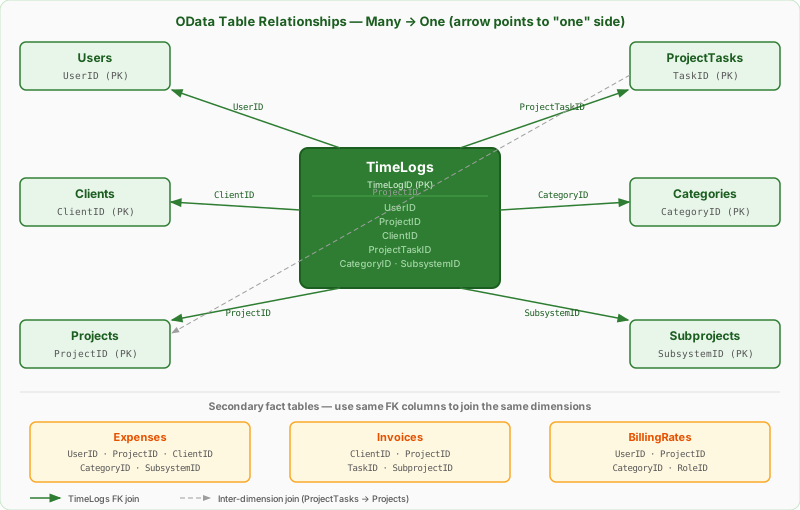
| From (many side) | Column | To (one side) | Column | Notes |
|---|---|---|---|---|
| TimeLogs | UserID | Users | UserID | Adds employee name, workgroup, department, rates |
| TimeLogs | ProjectID | Projects | ProjectID | Adds job name, status, dates, quoted cost |
| TimeLogs | ClientID | Clients | ClientID | Adds company name, contact info, terms |
| TimeLogs | ProjectTaskID | ProjectTasks | TaskID | Column names differ — ProjectTaskID → TaskID |
| TimeLogs | CategoryID | Categories | CategoryID | Adds category name and per-category rates |
| TimeLogs | SubsystemID | Subprojects | SubsystemID | Adds phase/sub-assembly name |
| Expenses | UserID | Users | UserID | Adds employee info to expense rows |
| Expenses | ProjectID | Projects | ProjectID | Enables project-level material cost totals |
| Expenses | ClientID | Clients | ClientID | Enables client-level material cost totals |
| Expenses | CategoryID | Categories | CategoryID | Groups expenses by category |
| ProjectTasks | ProjectID | Projects | ProjectID | Links task estimates to the parent job |
| ProjectTasks | ClientID | Clients | ClientID | Allows filtering tasks by client |
| Projects | ClientID | Clients | ClientID | Direct join for client-level project reports |
| Invoices | ClientID | Clients | ClientID | Core join for receivables dashboards |
| Invoices | ProjectID | Projects | ProjectID | Links invoices to specific jobs |
| BillingRates | UserID | Users | UserID | Identifies which employee a rate applies to |
| BillingRates | ProjectID | Projects | ProjectID | Scopes a rate override to a specific project |
| BillingRates | CategoryID | Categories | CategoryID | Scopes a rate override to a category |
| Categories | ProjectID | Projects | ProjectID | When a category is scoped to a project |
| Subprojects | ProjectID | Projects | ProjectID | Links each phase/sub-assembly to its parent job |
OData Type Reference
OData types map to familiar BI and programming types as follows:
| OData Type | What It Is | Power BI / DAX Type | JSON Example |
|---|---|---|---|
Edm.String |
Text (Unicode, variable length) | Text | "Machining" |
Edm.Boolean |
True/false flag | True/False | true or false |
Edm.Int32 |
32-bit integer | Whole Number | 42 |
Edm.Decimal (Precision 18, Scale 4) |
Fixed-point number — 4 decimal places | Decimal Number | "1.5000" (IEEE754 quoted) |
Edm.Date |
Date only — no time component | Date | "2026-06-21" |
Edm.DateTimeOffset |
Timestamp with UTC offset | Date/Time/Timezone | "2026-06-21T08:30:00-06:00" |
Decimal columns are returned as quoted strings in the JSON response ("1.5000" not 1.5). This is the IEEE 754 compatible format required by Power BI to avoid precision errors with Edm.Decimal. Power BI's OData connector handles this automatically — no manual conversion needed.
OData & Power BI Integration Guide — API key setup, step-by-step Power BI connection, all 11 M queries, DAX starter measures, and a list of other OData-compatible tools (Excel, Tableau, Python, R).
Build Four Dashboards in Power BI — step-by-step recipes for shop floor time, project budget, full job cost, and inventory health dashboards using these entity sets.
Integrations & Data FAQ