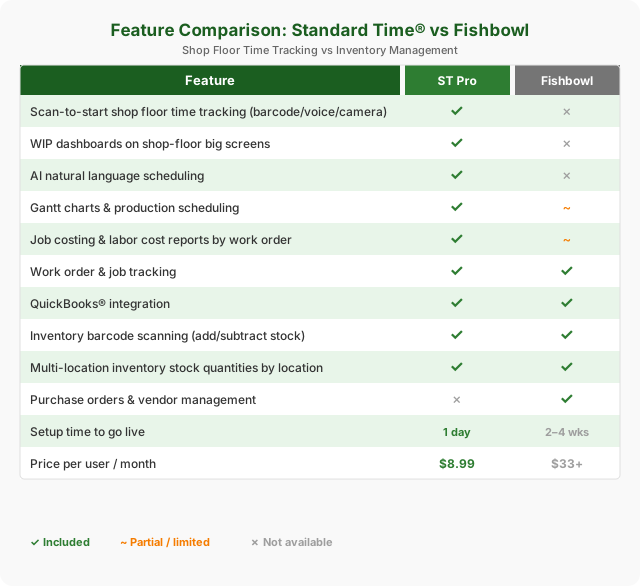
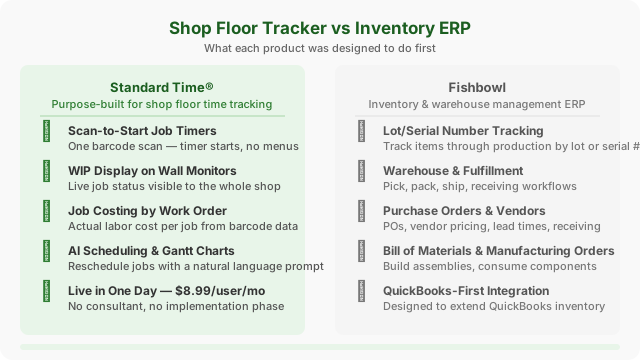
Fishbowl is an inventory and warehouse management ERP — powerful for tracking stock, but not built for shop floor time tracking. Standard Time® gives you barcode-driven job timers, WIP dashboards, AI scheduling, and job costing at $8.99/user/month, live in a single day.
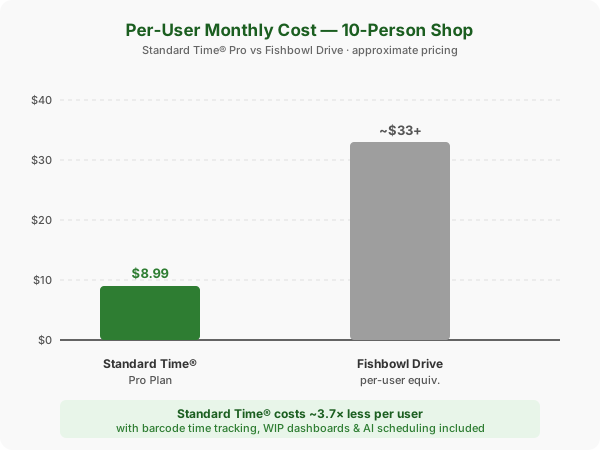
Standard Time® Pro is a flat $8.99/user/month with every feature included. Fishbowl Drive (cloud) pricing starts around $329/month — which works out to $33+/user equivalent for a 10-person team, not including setup or onboarding.
| Plan | Price | What's included |
|---|---|---|
| Standard Time® Pro | $8.99/user/mo | All features — barcode scanning, WIP dashboards, job costing, Gantt charts, AI scheduling, inventory scanning, QuickBooks integration |
| Standard Time® Enterprise | Contact us | Everything in Pro + dedicated server, multi-site coordination |
| Fishbowl Drive | ~$329+/mo | Cloud inventory & warehouse management, manufacturing orders, QuickBooks sync; setup and onboarding separate |
| Fishbowl Warehouse / Manufacturing (perpetual) | $4,395+ upfront | On-premise perpetual license; annual maintenance and support fees apply; requires server setup |
The two products have different core strengths. Standard Time® leads on shop floor visibility and time tracking; Fishbowl leads on lot/serial tracking, fulfillment workflows, and purchasing depth.
One scan starts a job timer — no menus, no typing. Fishbowl's barcode scanning is designed for inventory moves, not for starting and stopping employee time on work orders.
Every scan creates a time log showing exactly how many hours each employee spent on each work order — ready for job costing and QuickBooks sync. Fishbowl tracks material costs but not granular labor by scan.
Drag-drop Gantt for production planning plus AI that reschedules jobs when you describe changes in plain language. Fishbowl has no AI scheduling capability.
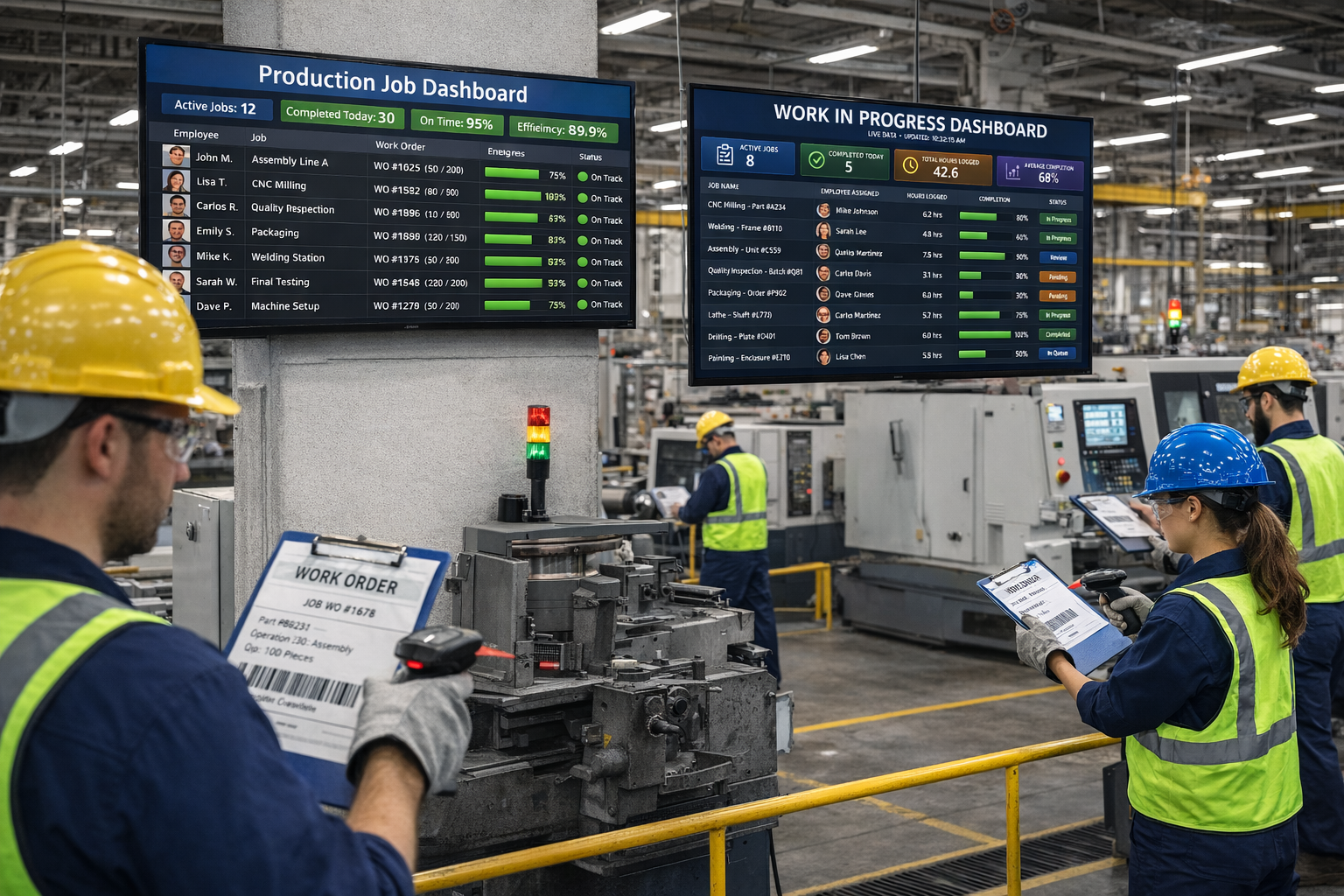
Display live job status, employee activity, and capacity on wall-mounted monitors. Fishbowl has inventory reports but no shop floor WIP display built for large screens.
Both products use barcode scanning — but for entirely different purposes. Fishbowl scans items to track where inventory moves. Standard Time® scans to record when an employee starts and stops working on a job. If you need job-costed labor data, only one of these solves the problem.
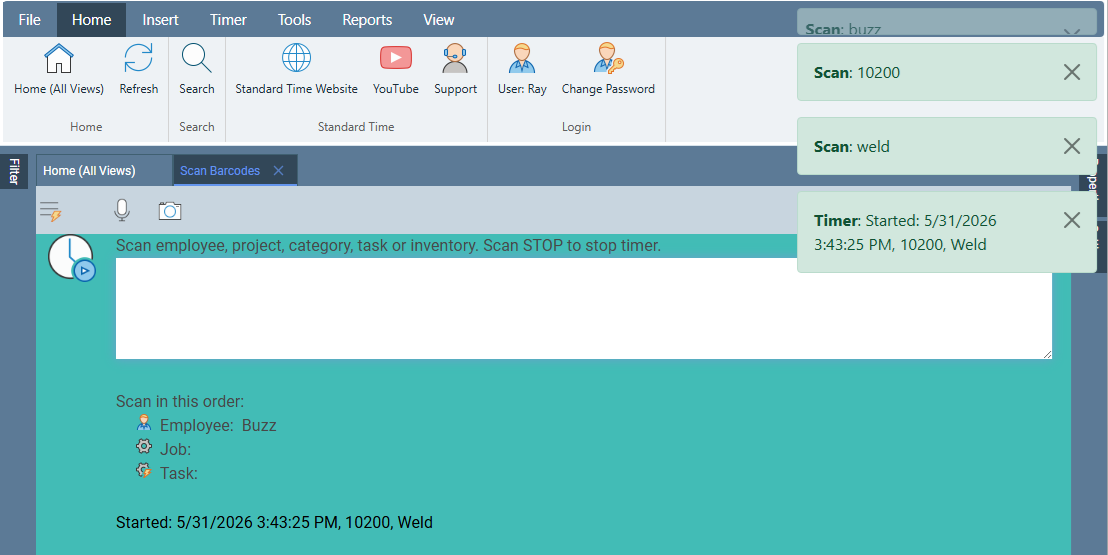
Starting a job timer by scan
Scan the employee barcode, then the work order — the timer starts immediately. The screen confirms: Started: Work Order 10200, Weld. No typing, no menus, no delays.
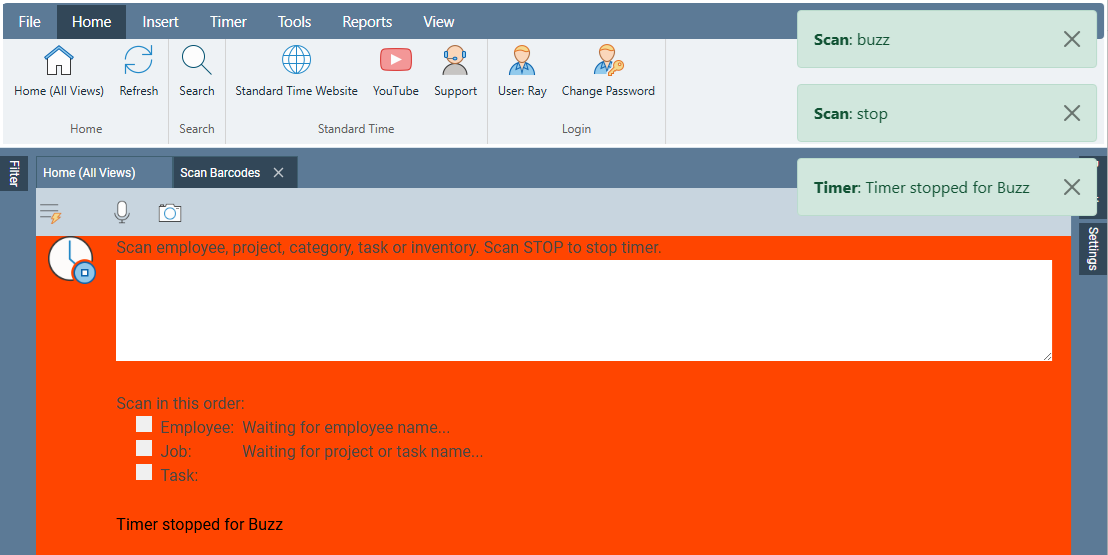
Stopping the timer
Scan STOP and the timer stops. The screen confirms Timer stopped for Buzz. The time log is written — ready for job costing and QuickBooks sync.
Camera capture — use any phone, tablet, or notebook camera. No dedicated scanner hardware required.
RFID tap — tap a badge or work order traveler to start a timer instantly.
Voice recognition — speak the job number to the scanner.
Fishbowl has barcode scanning built around inventory moves:
In Standard Time®, every scan creates a time log tied to a specific employee and work order — the raw material for job costing. Fishbowl scans move things, not time.
Every barcode scan creates a time log tied to a specific work order and task. That data flows into job cost reports, timesheets, and Gantt charts — automatically, with no manual entry.
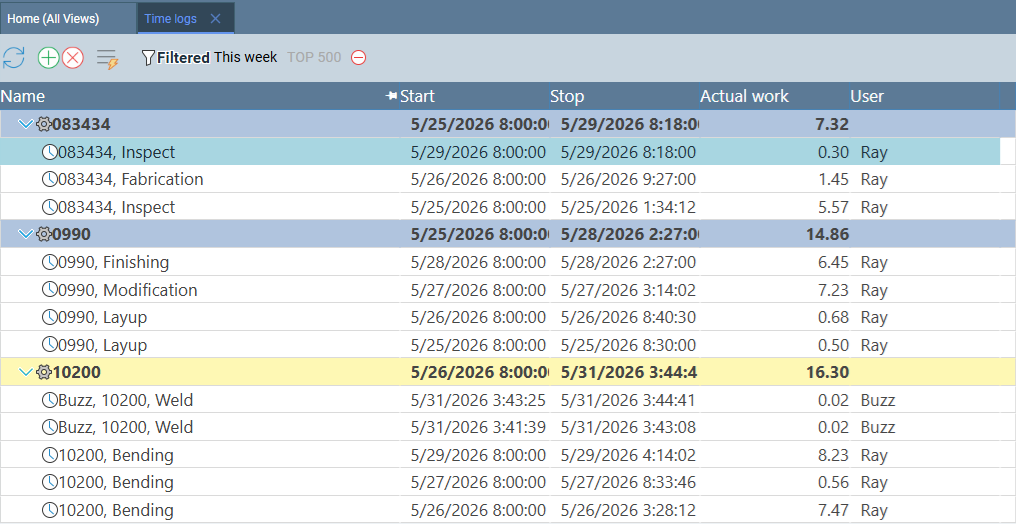
Time logs by work order
Every scan creates a time log with the work order, task, employee, start time, stop time, and actual hours. Work order 10200 shows Weld and Bending time broken out by day and worker — ready for job costing.
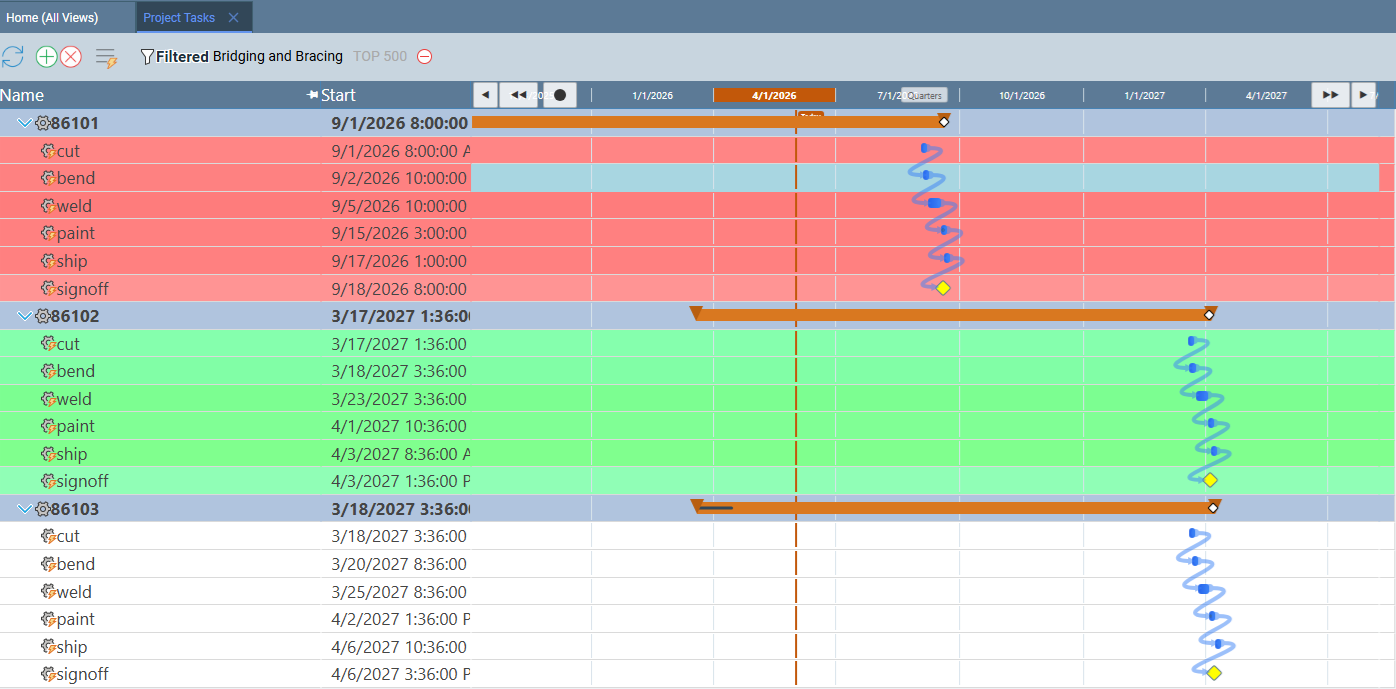
Gantt chart — production scheduling
Drag-and-drop Gantt charts for production scheduling. Rearrange jobs, adjust deadlines, and see the impact across your schedule instantly. Ask the AI to reschedule by deadline priority or employee availability.
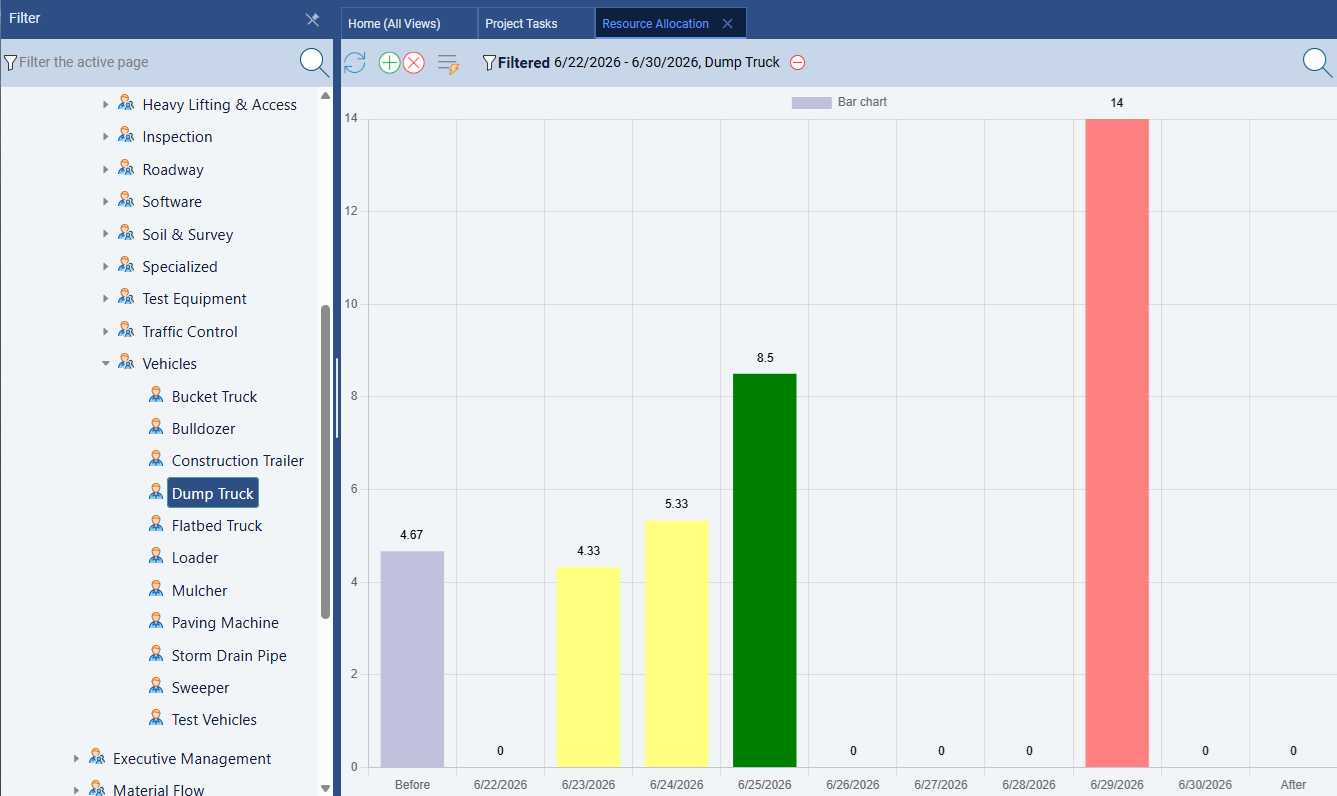
Resource allocation & capacity
See immediately which employees are over- or under-allocated. Standard Time® color-codes capacity so you can rebalance the schedule before it becomes a bottleneck.
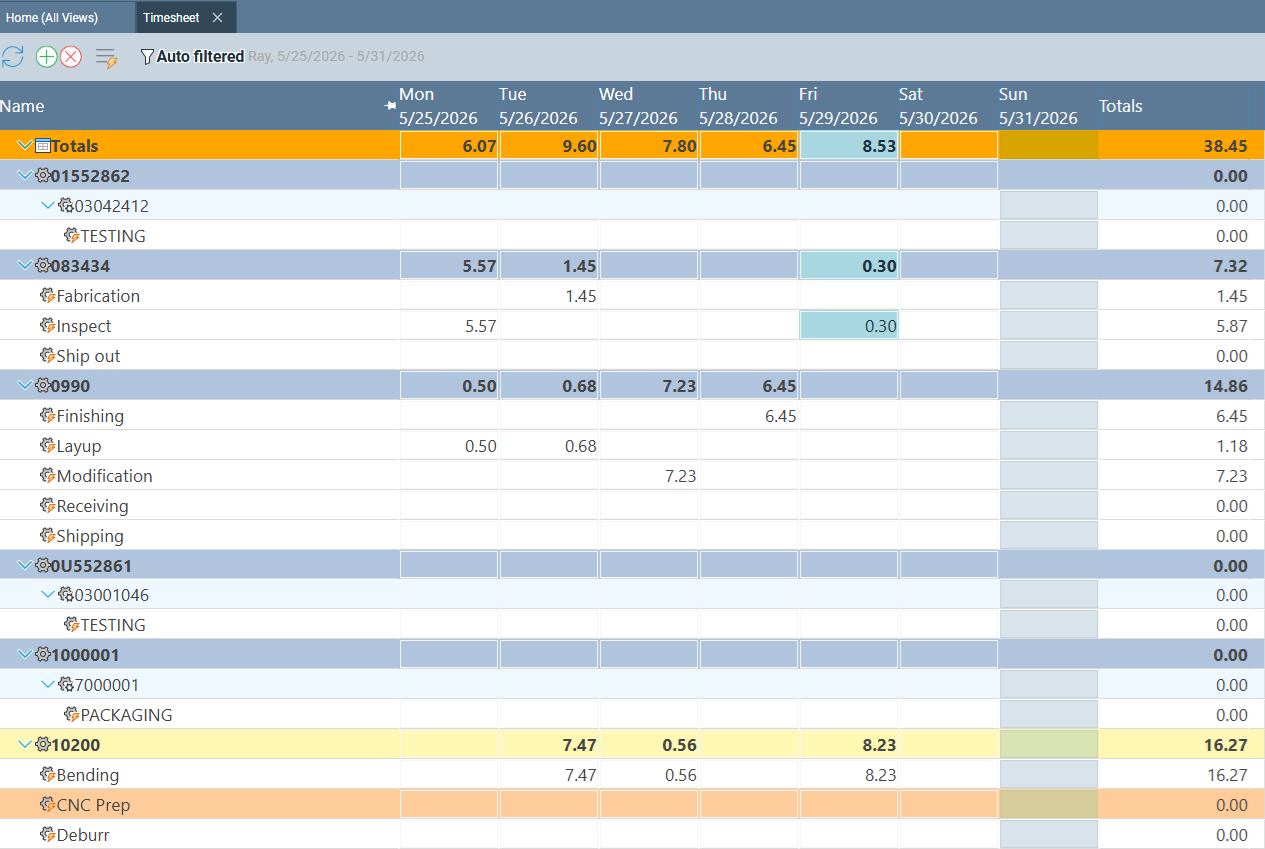
Weekly timesheet by project
The timesheet view breaks down hours by work order and task across the week — exactly what job costing requires. This data syncs to QuickBooks automatically.
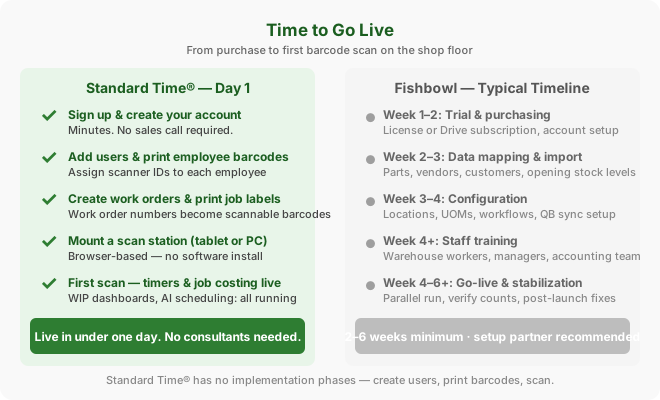
Standard Time® is designed to be running the day you sign up. Fishbowl requires data mapping, inventory import, and configuration before it's useful — which typically takes two to six weeks for a real shop.
Live in under one day. No consultant required.
Typical timeline: 2–6 weeks, depending on inventory complexity. Fishbowl recommends a certified partner for implementation — additional cost.
Standard Time® and Fishbowl solve different problems. Understanding which one matches your pain is the whole comparison.
Standard Time® includes inventory reorder levels, reorder quantity, reorder alert emails, custom reorder scripts, and project templates that automatically trigger a build-in-house job when stock drops below the reorder threshold. That's a more flexible replenishment system than most shops expect from a $8.99/user time tracker.
Fishbowl is a legitimate product with a long track record for inventory management, especially for manufacturers who need lot/serial number tracking, deep pick/pack/ship fulfillment workflows, or multi-level BOM assembly builds beyond what Standard Time® covers. If your problem is "we need to trace every part by lot number" or "we need full warehouse fulfillment workflows" — Fishbowl is worth evaluating.
But if your problem is "we don't know what jobs actually cost in labor" or "we can't tell who's working on what job right now" — Fishbowl doesn't solve that. It doesn't have scan-to-start timers, WIP dashboards, or AI-assisted production scheduling. Those are Standard Time® features, and they're included at $8.99/user/month with no setup cost.
Many shops run both: Fishbowl for inventory and QuickBooks for accounting, and Standard Time® for job timers and labor cost tracking. Standard Time® integrates with QuickBooks, so actual labor from barcode scans flows directly into your financial system — no double-entry, no spreadsheets.
Get the Shop Floor Features You Need — at $8.99/User/Month
Standard Time® Pro includes barcode scanning, WIP dashboards, AI scheduling, Gantt charts, job costing, and QuickBooks integration. Live in one day — no implementation required.
See Pricing & Plans Ask a Question