29 April 2026
Track Work Orders and Employee Hours
On a busy shop floor, the same questions come up every day: Where is that job? Who is working on it right now? When will it be done? How many hours have we spent on it? Standard Time® answers all of these in real time — no phone calls, no clipboard chasing, no guessing.

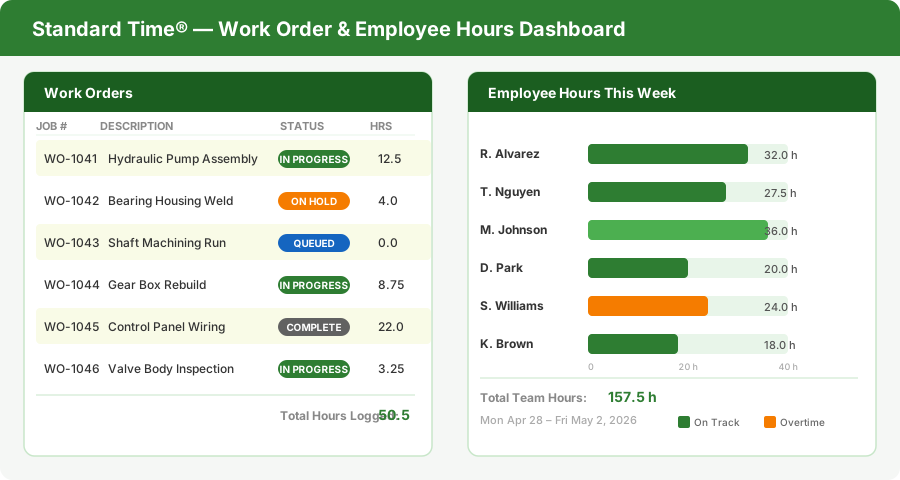
Standard Time® shows every open work order and every employee's logged hours in a single live dashboard — updated the moment a worker clocks in or out.
Track Work Orders and Employee Hours Together
Most shops track work orders in one system and time in another — a job ticket on the floor and a timesheet in the office. The result is a gap: hours get lost, jobs get under-billed, and nobody knows the true cost of a work order until it is already shipped.
Standard Time® closes that gap by connecting work orders directly to time logs. When an employee scans a barcode to clock into a job, the time is posted to that specific work order automatically. Every hour is tied to a job number, a task, and a name. There are no separate timesheets to reconcile. The work order and the labor cost update together in real time.
This means a shop manager can open any work order and immediately see the total hours logged, who worked on it, and how the actual time compares to the estimate — without asking anyone.
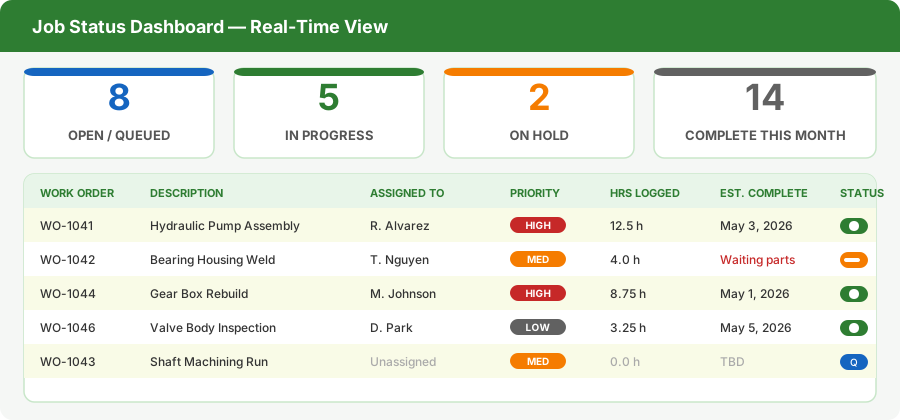
Every work order has a live status — Queued, In Progress, On Hold, or Complete — with assigned employee, priority, hours logged, and estimated completion date all visible at once.
Get Job Status at a Glance
Every work order in Standard Time® carries a status that updates automatically as employees clock in and out. A job moves from Queued to In Progress the moment the first employee scans in. It flips to Complete when the last task is signed off. Managers never have to update a status manually — the data flows from the shop floor.
The job status dashboard shows the full picture at once: how many jobs are open, how many are active right now, which ones are on hold, and how many shipped this month. Each row in the list shows the work order number, description, who it is assigned to, its priority level, hours logged so far, and the estimated completion date.
Color coding makes priorities and problems visible instantly. A red HIGH badge means the job is urgent. An orange ON HOLD flag means something is blocking progress — a missing part, a quality issue, a waiting signature. You see the problem before someone calls to tell you about it.
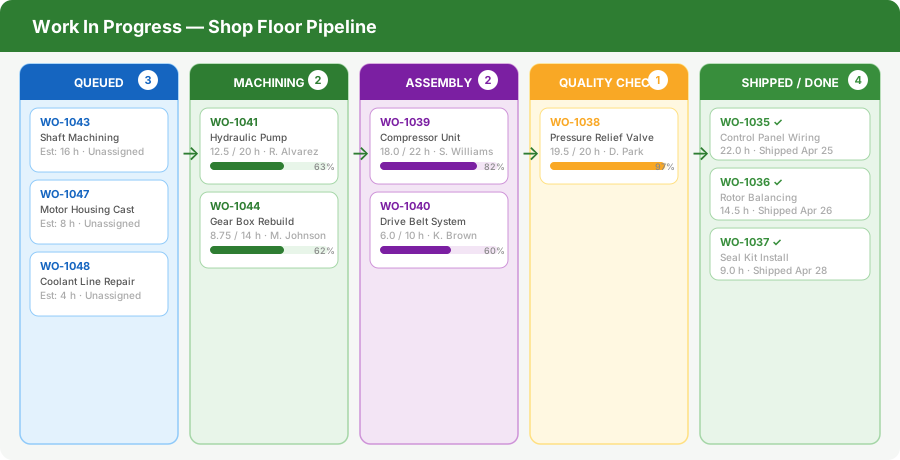
The WIP pipeline shows where every active job sits in the production process — from the queue through machining, assembly, and quality check, all the way to the shipping dock.
Work In Progress — See the Whole Pipeline
Work in progress is the lifeblood of a manufacturing operation, and losing visibility into it is how jobs get dropped. Standard Time® shows every active work order as a card in a live pipeline, organized by production stage. Each card displays the job number, description, assigned employee, hours logged so far, and a progress bar showing how close it is to completion.
The stages reflect your actual shop floor process — Queued, Machining, Assembly, Quality Check, Shipped — and the counts on each column header tell you at a glance where load is building up. If six jobs are sitting in Assembly and only one person is assigned there, you see the bottleneck before it causes a delay.
When a job moves to the next stage, the card moves with it. The pipeline is always current because the data comes directly from employee clock-in and clock-out events. No one has to drag cards or update a board manually.
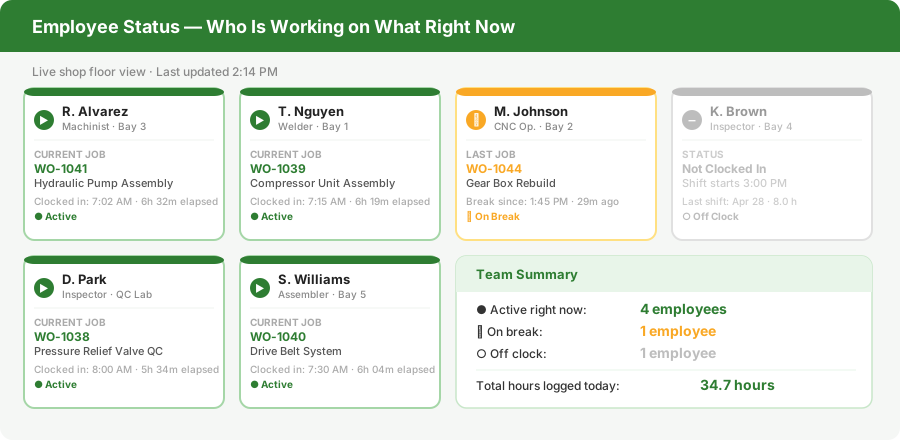
Each employee card shows their current job, how long they have been clocked in, and whether they are active, on break, or off clock — updated live as employees scan in and out.
Employee Status — Who Is Working on What
A shop manager's hardest question is often the simplest one: who is working on what right now? With Standard Time®, the answer is always one click away. The employee status view shows a card for every worker — name, role, bay assignment, current work order, and exactly how long they have been clocked in.
Status indicators make the situation visible at a glance. A green active dot means the employee is clocked in and working. A yellow pause icon means they have taken a break. A gray circle means their shift has not started yet. You can see the entire team's status without walking the floor or making a single phone call.
This view is especially valuable for tracking overtime before it becomes a problem. If an employee has been clocked in for eight hours and the shift was supposed to end at six, the elapsed time on their card makes that visible before payroll needs to flag it. Managers can reassign or relieve workers before overtime accumulates unnecessarily.
The team summary panel at the bottom gives a quick roll-up: how many employees are active, how many are on break, how many are off clock, and the total hours logged by the whole team for the current shift or day.
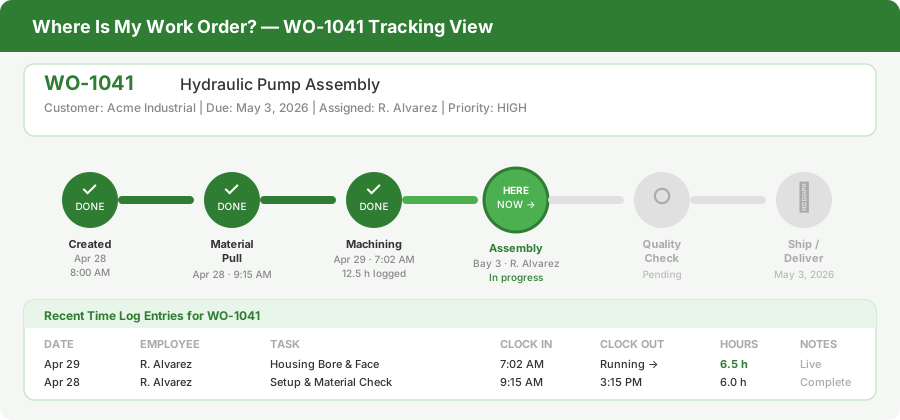
The work order tracking view shows every step a job passes through, which steps are complete, which step it is on right now, and which steps remain — along with the full time log for each entry.
Where Is My Work Order Now?
When a customer calls to check on their job, the last thing you want to do is say "let me find out and call you back." Standard Time® gives you the answer in seconds. Every work order has a tracking view that shows its complete journey through the shop — from the moment it was created to the moment it ships.
Each step in the process is shown on a timeline: Created, Material Pull, Machining, Assembly, Quality Check, Ship. Completed steps are marked with a checkmark and the date and time they were signed off. The current step is highlighted so there is no ambiguity about where the job stands right now. Remaining steps are shown as upcoming, so you can see how much of the process is still ahead.
Below the timeline, a full time log shows every clock-in and clock-out entry for that work order — who worked on it, which task they were doing, what time they started, what time they stopped, and how many hours they logged. If a customer asks how much time went into their job, you have the complete answer on one screen.
This level of detail also helps you audit your own process. If a job sat in Assembly for three days without anyone logging time, that gap shows up in the time log. You can investigate why the job stalled instead of finding out after the due date passes.
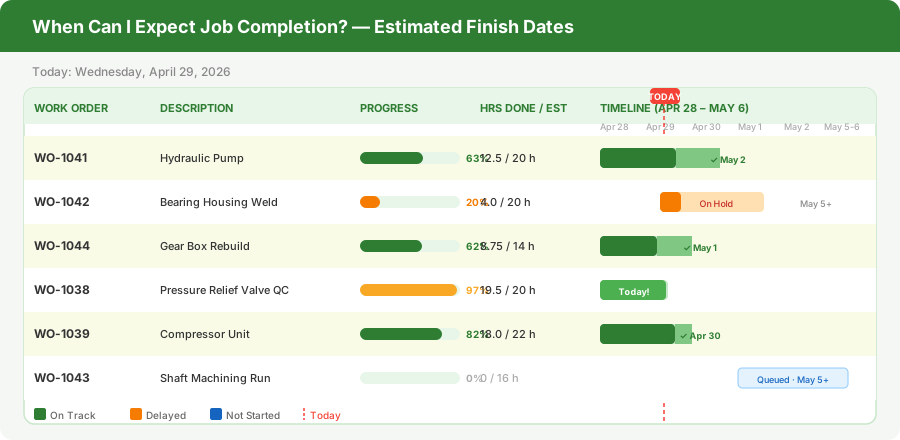
The completion estimate view maps every active work order to a timeline, showing current progress, hours remaining, and the estimated finish date — so you can give customers accurate answers without guessing.
When Can I Expect Job Completion?
Estimated completion dates are only useful if they are grounded in real data. A date entered at the beginning of a job quickly becomes meaningless if actual hours don't track against the estimate. Standard Time® keeps completion estimates current by calculating them from real logged hours rather than from static schedule entries.
The completion estimate view shows every active work order as a bar on a timeline. Each bar has two parts: the portion of the job already done (shown in solid green) and the remaining work (shown in lighter green). A vertical red line marks today, so you can see at a glance which jobs are on track and which are running behind relative to their due dates.
The progress column shows percentage complete based on hours — if the estimate for a job was 20 hours and 12.5 hours have been logged, the job is 63% complete. This is more reliable than subjective progress reports from workers because it comes directly from clocked hours. If 63% of the hours are spent but only 40% of the tasks are done, that discrepancy is visible immediately.
Jobs on hold show the delay clearly — the bar stops progressing, and the estimated finish date slips. Queued jobs that have not started yet show up with no progress and a tentative start date, so you can plan capacity around them. The full picture lets you make realistic commitments to customers instead of repeating optimistic estimates that keep getting pushed out.
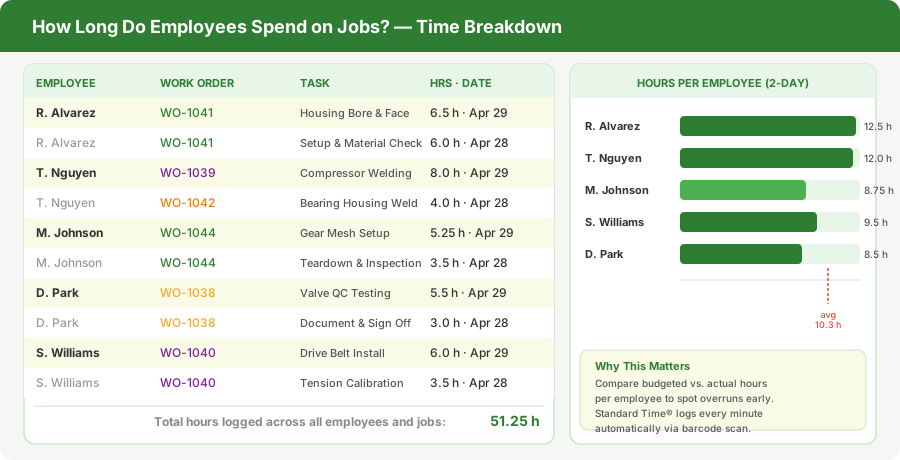
The time breakdown report shows exactly how many hours each employee spent on each job and task, making it simple to compare actual labor against estimates and catch cost overruns before they grow.
How Long Do Employees Spend on Jobs?
Labor cost is almost always the largest variable in manufacturing job profitability. If you cannot measure how long your employees actually spend on each job, you cannot price future jobs accurately or catch overruns before they erase your margin. Standard Time® makes this measurement automatic.
Every clock-in and clock-out event is recorded with the employee's name, the work order number, the specific task, the start time, the stop time, and the total duration. That data feeds into a time breakdown report that shows each employee's contribution to each job in precise hours and fractions of hours — not estimates, not daily summaries, but the actual time captured at the moment of the scan.
The bar chart on the right side of the view makes it easy to compare employees at a glance. An average line marks the expected hours per person. Anyone significantly above the line may need support or a workload adjustment. Anyone consistently below may have capacity for additional assignments. These are decisions you can make with confidence because the data is accurate.
Over time, this data becomes your most valuable estimating resource. When you quote a similar job in the future, you can look at exactly how many hours past jobs of that type required and who worked on them. Your estimate goes from a guess to a data-backed commitment — and your customers notice the difference.
One System for the Whole Shop Floor
Work order tracking, employee hours, job status, WIP visibility, completion estimates, and labor cost reporting all come from the same data in Standard Time®. There is no separate time clock system feeding into a separate job costing system feeding into a separate project tool. One scan connects everything.
When an employee scans a barcode to start working on a job, that single action updates the work order status, logs the start time against the employee record, advances the WIP pipeline, and recalculates the completion estimate. When they scan out, the same chain runs in reverse — the hours are posted, the progress bar advances, and the job cost updates. The manager sees all of it without asking anyone.
This connected view is what lets a shop of any size answer the questions that used to require a floor walk, a phone call, or a meeting: Where is the job? Who is on it? When does it finish? How much has it cost so far? Standard Time® answers all of them before you finish asking.